Displaying server data instantly with Vue Query
How can you improve the way server data is displayed in a Vue.js app by using a cache?
Vue Query (the Vue.js flavour of TanStack Query) makes it easy to cache server data and display it instantly.
The result is instant rendering when a page is visited, and while data is being mutated.
We often reach for a state management library such as Pinia or Vuex. They work well for client-side data, a little less so for asynchronous server data.
TanStack Query provides the useQueryClient, useQuery and useMutation composables, which let you display server data (from the second visit onwards) and update it in the UI very smoothly.
useQuery: read and cache
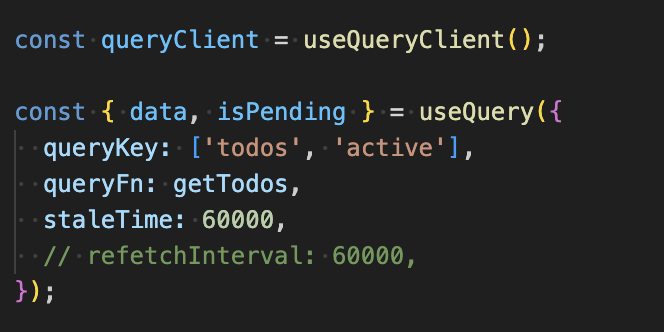
In useQuery:
queryKeyis an array that identifies the cached results for this query.staleTimedefines how long (60 seconds, for instance) the data is considered "fresh", and therefore how long this cache is used to render the data.refetchIntervalautomatically re-runs the same query at a regular interval.
useMutation: update and invalidate
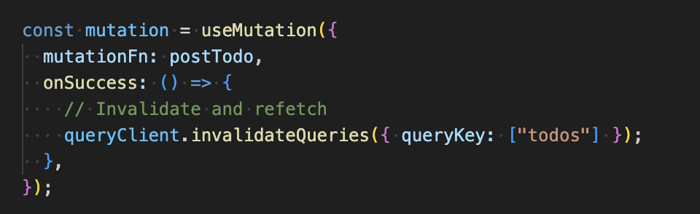
useMutation handles mutations of server data, together with invalidateQueries, which triggers a refetch of the data.
Optimistic updates
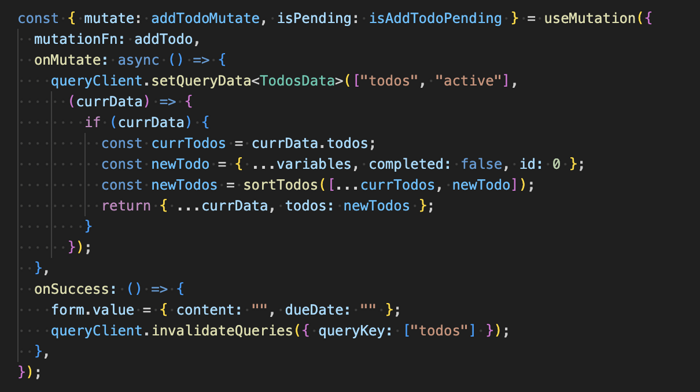
useMutation also enables "optimistic updates": during an update, we anticipate the new value of the server data by editing the cache immediately and displaying it. The query then updates the data in the background once it resolves.
To do so, we call setQueryData inside the onMutate callback.