Redirecting logged-out users with a Nuxt route middleware
How do you redirect logged-out users before they reach a Nuxt page?
With a route middleware.
A route middleware is a function called before each navigation. It lets you redirect the user before they reach the page. It's the equivalent of a navigation guard in Vue Router.
What a middleware receives and returns
The route middleware receives the destination route (to) and the origin route (from):
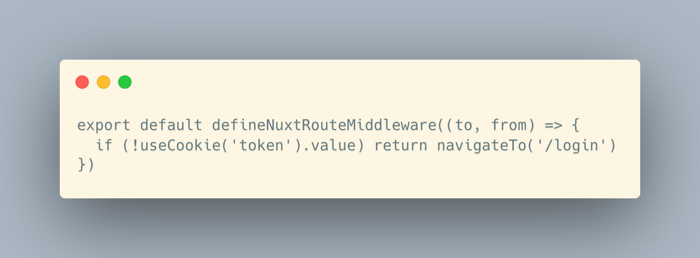
What it returns decides what happens next:
- nothing: navigation continues;
navigateTo('/login'): a redirect, which becomes a real HTTP redirect when it happens server-side;abortNavigation(): navigation is stopped, optionally with an error.
The three kinds of middleware
There are three kinds of middleware, depending on where you declare them:
- inline: directly in
definePageMeta, applied to a single page; - named: a file in
middleware/(for exampleauth.ts), enabled page by page withdefinePageMeta({ middleware: ['auth'] })from the page itself; - global: a file with the
.globalsuffix (for examplemiddleware/analytics.global.ts), run on every route change. Useful for analytics, for example.
In what order do they run?
When there are several middleware:
- Global middleware run first, in alphabetical order of their file names, which is why prefixes like
01.,02.are useful. - Then named middleware, in the order of the array.
- Finally, inline middleware.